Cherry-pick and backport Git commits in ddugit
A bug fixed on main often needs to reach a release branch too. In ddugit you drag the fix across, or let the backport sheet list every fix a branch is still missing.
Updated
Cherry-picking copies the change one commit made onto another branch as a new commit. Nothing else from the source branch comes with it, which is what makes it the tool for backports.
Cherry-pick one commit by dragging
- Find the commit with the fix and the tip of the branch that needs it on the graph.
- Hold Alt (⌥ on a Mac) and drag the commit onto the tip of that branch. The hint at the top changes to “Release to cherry-pick this commit”.
- Release, check the commit in the dialog, and confirm.
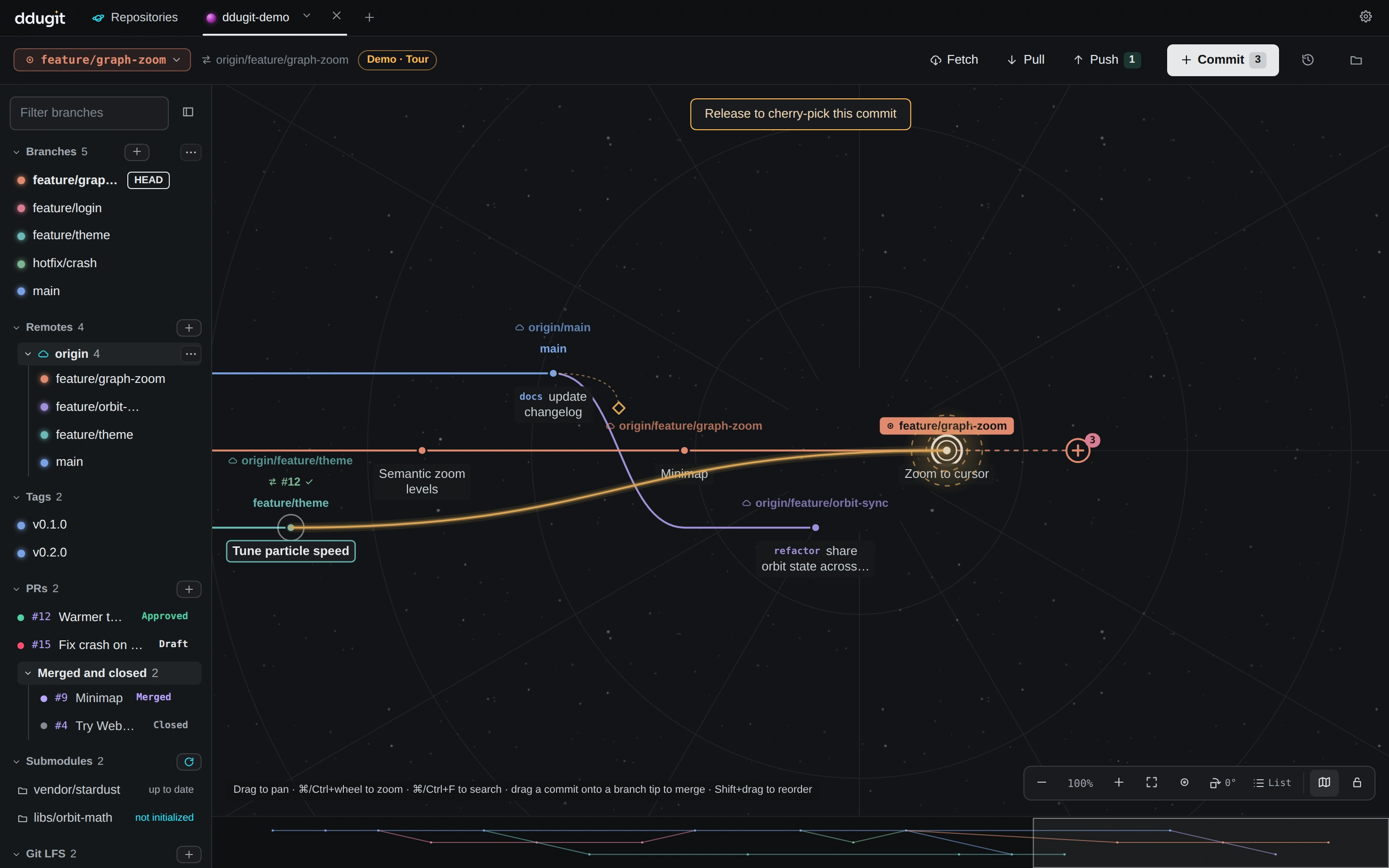
Prefer menus? With the target branch checked out, right-click the commit and choose Cherry-pick onto <your branch>…. A plain drag (without Alt) merges instead, so watch the hint.
Find and apply every missing fix
For a release branch that should get many fixes from main, open the backport sheet. With the release branch checked out, right-click the branch the fixes come from (such as main) and choose Backport: commits missing from <your branch>…. Or use Backport… in the ⋯ menu above the branch list and pick both branches in the sheet.
- Set From to where fixes land (such as
mainororigin/main) and Into to the branch that needs them. - Every commit gets a state: Missing, Applied (the same change is already there, even with a different commit ID), Applied (-x) (an earlier cherry-pick recorded it), or Ignored (you marked it as not needed for this branch).
- Tick the missing commits you want and click Cherry-pick onto …. They are applied oldest first, each recording where it came from (
-x), so the next comparison counts them as applied.
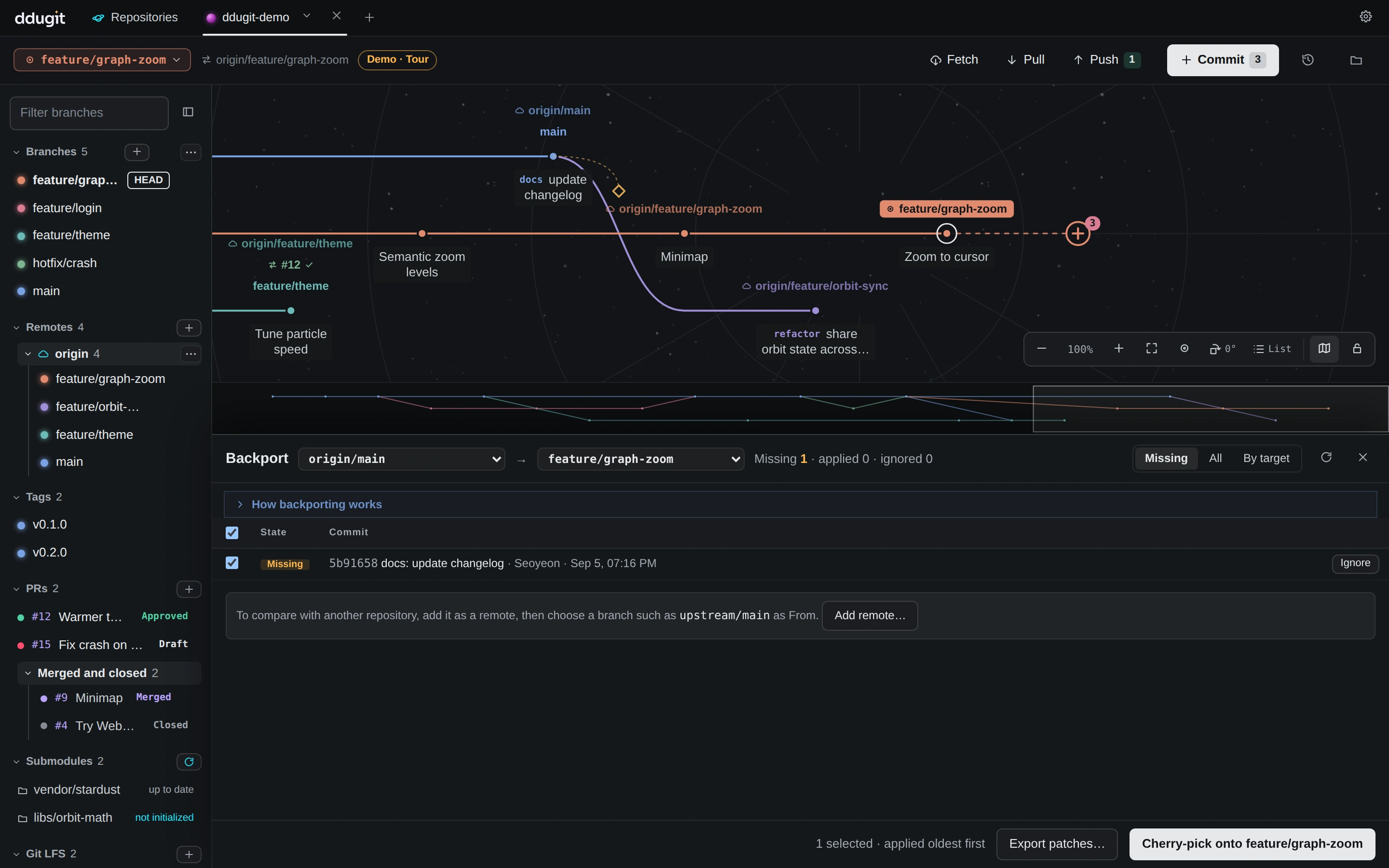
Can't push to the target, such as a customer's repository? Export patches… saves the selected commits as patch files to apply there. To compare with another repository, add it as a remote first and pick its branch as From.
Comparing branches is free. Cherry-picking, exporting and ignoring from the backport sheet are part of ddugit Pro; single cherry-picks by drag or menu are free.
If a fix doesn't apply cleanly
An older branch may have changed the same lines. The cherry-pick stops and the conflict opens in its own sheet: see resolving conflicts. Then click Continue, Skip to leave that commit out, or Cancel.
On the command line
Check out the target branch and pick by commit ID. Several commits are applied in the order given:
git switch release/2.4
git cherry-pick -x 3f9c2e1
git cherry-pick -x 3f9c2e1^..7e44b09    # a range, 3f9c2e1 through 7e44b09
git cherry-pick --continue              # or --skip, --abort after a conflict
List the commits on main whose changes aren't on the release branch yet, or send them as patches:
git log --oneline --no-merges --cherry-pick --right-only release/2.4...main
git format-patch -o patches/ 3f9c2e1^..7e44b09